We build apps people keep on their home screen.
MoonLabs is an independent software studio building privacy-focused mobile applications for consumers and small businesses. GroomDesk, ParKeeper Golf Scorecard & GPS, SitePic, Tankobon, and SalonMate are live on the App Store now. Here's the full lineup.


GroomDesk - Pet Grooming App
The offline-first grooming app that works as hard as you do.
GroomDesk is the all-in-one booking manager built for solo groomers and small salons who want a professional tool, not a spreadsheet. Every client, every pet, every appointment. Stored privately on your device, always available, even offline.
Built to replace the spreadsheet.
Every tool a solo groomer or small salon needs to run bookings day to day, with nothing to configure and nothing running in the cloud.
Works everywhere, even offline
No Wi-Fi. No cloud subscription. No outages. Your entire business lives on your device, fully functional whether you're in the salon or in the field.
Smart booking management
Schedule appointments with a tap. Calendar and list views, status tracking (pending, confirmed, completed, no-show), one-tap completion, and instant appointment sharing via iMessage or email.
Pet profiles with temperament tracking
Know every animal before they walk in the door. Color-coded temperament badges (from Gentle to Bites) so you and your staff are never caught off guard.
Before & after photo gallery
Capture professional before/after photos for every groom. Stored privately on-device, organized by booking, shareable instantly via the iOS share sheet.
Deposit & payment tracking
Log deposits at booking time and mark balances paid on the spot. Know exactly who's paid, who hasn't, and get automatic reminders when a deposit is still outstanding.
Automatic appointment reminders
Local push notifications, no backend, no fees. Reminders fire 24 hours and 1 hour before each appointment, automatically rescheduled if the booking changes.
Service menu
Define your services with prices and durations. Price auto-fills at booking time so revenue records are always accurate, and editing a service never alters past booking history.
Backup & restore
Export a full zip backup of your data and photos anytime. Restore it with a single tap.


ParKeeper Golf Scorecard & GPS
Score smarter. Play anywhere. Own your data.
ParKeeper is the scorecard app for golfers who just want to play. Score in three taps, get live GPS yardage on any course in the world, and watch your handicap trend over time. No account, no ads, no clutter. Your data stays on your iPhone.
Built for golfers who just want to play.
No account, no ads, no feed. Just fast scoring, live GPS on any course, and a handicap you can actually trust.
Score in three taps
Enter your round fast, then get back to the game. Optional detailed mode tracks putts, fairways, and penalties for the golfers who want the extra depth.
Works on any course, anywhere
Pin your own greens once, get live GPS yardage forever. No course database subscription required.
Real handicap tracking
Calculated from your recent rounds, with trend charts and stats over time.
Score from your wrist
Full Apple Watch support, syncs automatically. Phone stays in the bag.
Play vs. You
Compare today's round to your own average, hole by hole, no social feed required.
Shareable moments
Turn any round into a clean scorecard image for your group chat, and get a personal Year in Golf recap each season with rounds played, best scores, and handicap progress.
Coach-ready PDF reports
Export your stats, handicap trend, and recent rounds as a clean PDF to send your coach or golf buddy.
Bring your buddies
Track up to 3 guest players on one card, no sign-ups needed.
Privacy by design
Everything lives on-device. No account, no tracking, no ads. Optional iCloud backup only if you want it.
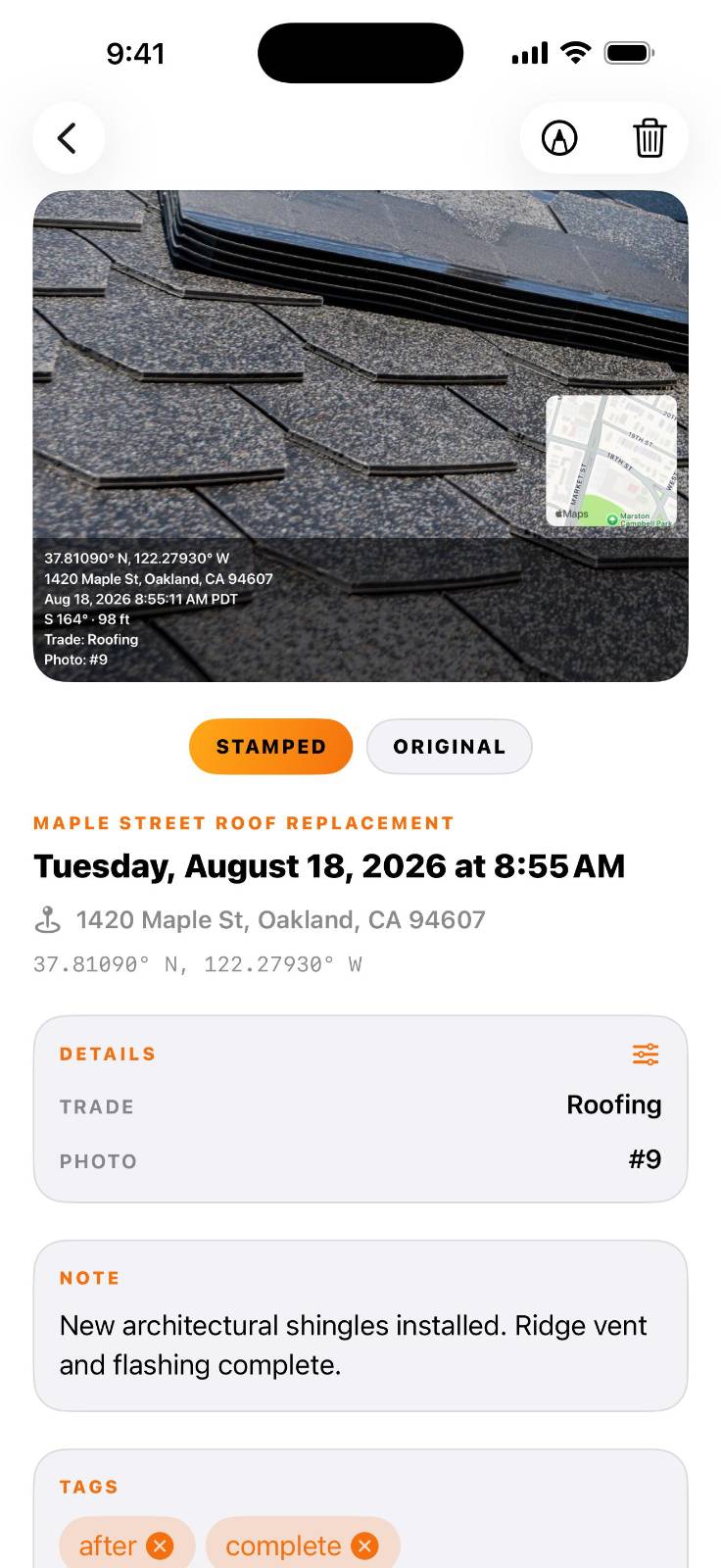
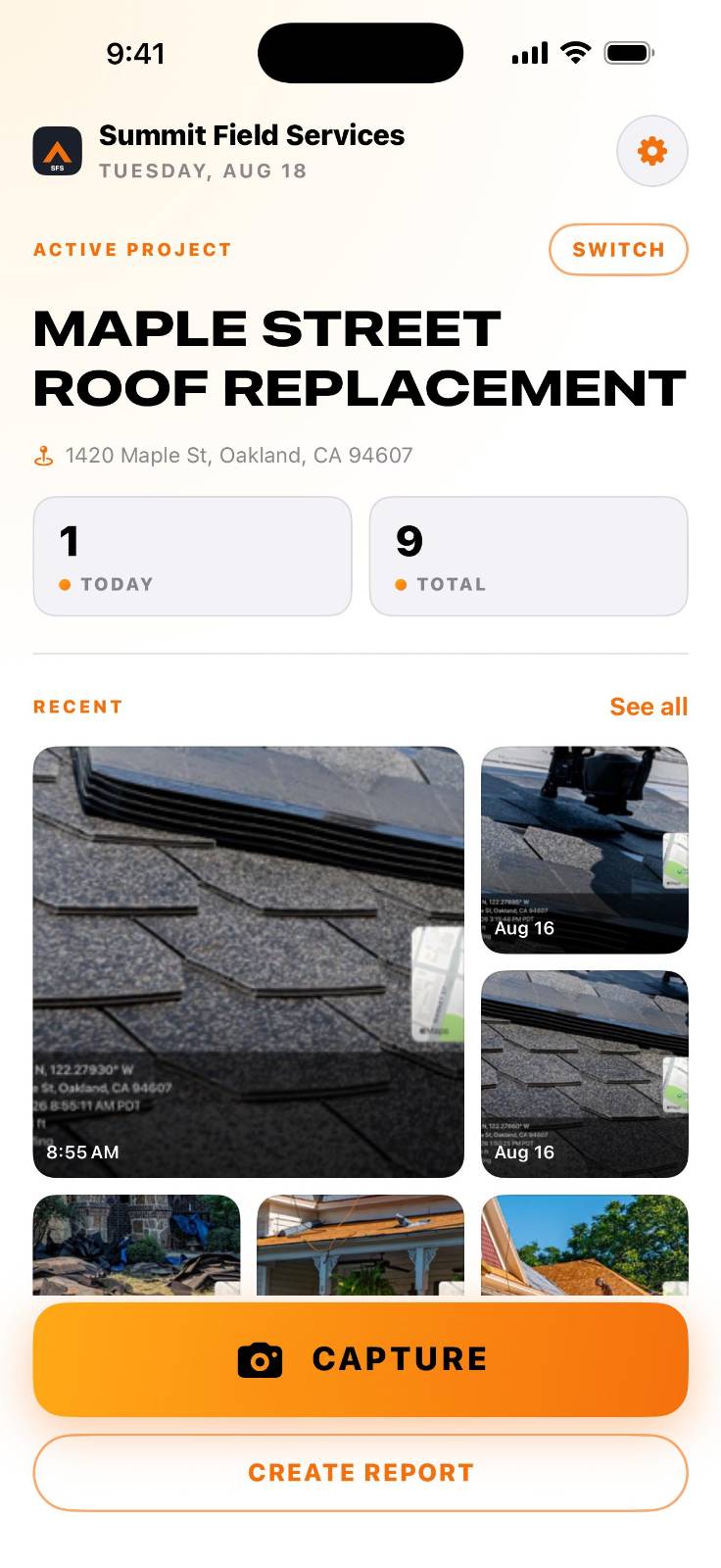
SitePic - Job Site Photo Reports
Capture the work. Stamp the proof. Deliver the report.
SitePic burns the time, GPS coordinates, street address and a map pin into every job site photo, keeps it filed under the right job, and turns the set into a branded PDF for the client. No account, no crew seats, no upload.
Proof of work, from the first photo to the final report.
Built for contractors, inspectors and field technicians who have to prove the work happened: stamped at capture, filed under the job, exported as the report the client actually receives.
Every photo carries its own proof
The stamp is burned into the image, not stored as metadata a client can strip. Date and time to the second with time zone, GPS to five decimal places, the reverse-geocoded street address, compass heading, altitude, and a map thumbnail with a pin. Switch off any line you do not need.
Stamp fields you define
Add up to three of your own fields: unit number, grid reference, trade, work order, or a photo number that increments as you shoot. Set them once per job, override them on any single photo.
Filed by job site, not by camera roll
One project per job, with client name and site address. Return to a site you have shot before and SitePic recognizes the location and offers to switch to it. Tag, note and search across a job, then archive it instead of deleting it.
Client-ready PDF reports
Cover page with your logo, company name and contact line, the job name, the report date and the dates the work covers. Numbered photo entries, two per page, each with its stamp data, custom fields and your note. Send the whole job or just the photos you pick.
Mark the defect on the photo
Arrows and boxes on any photo, plus freehand lines and text labels with Pro. Four colors, three stroke weights. Annotations stay editable, so a mark can be moved or removed without recapturing the shot.
Stamped video walkthroughs
Record a walkthrough and SitePic embeds the same GPS and time stamp into the footage, with sound, ready to attach alongside the stills.
Your data stays on your device
No account, no sign-up, no analytics, no ads, no third-party trackers. Photos stay on your phone. Saving a stamped copy to your Photos library is free, and Pro backs a whole job up to your own iCloud Drive so it restores onto a new phone.
Built for the field
Works with no signal: coordinates are captured on device and the street address fills in when the phone reconnects. Light mode for direct sunlight, dark mode for early starts. Feet or meters. English and Spanish.
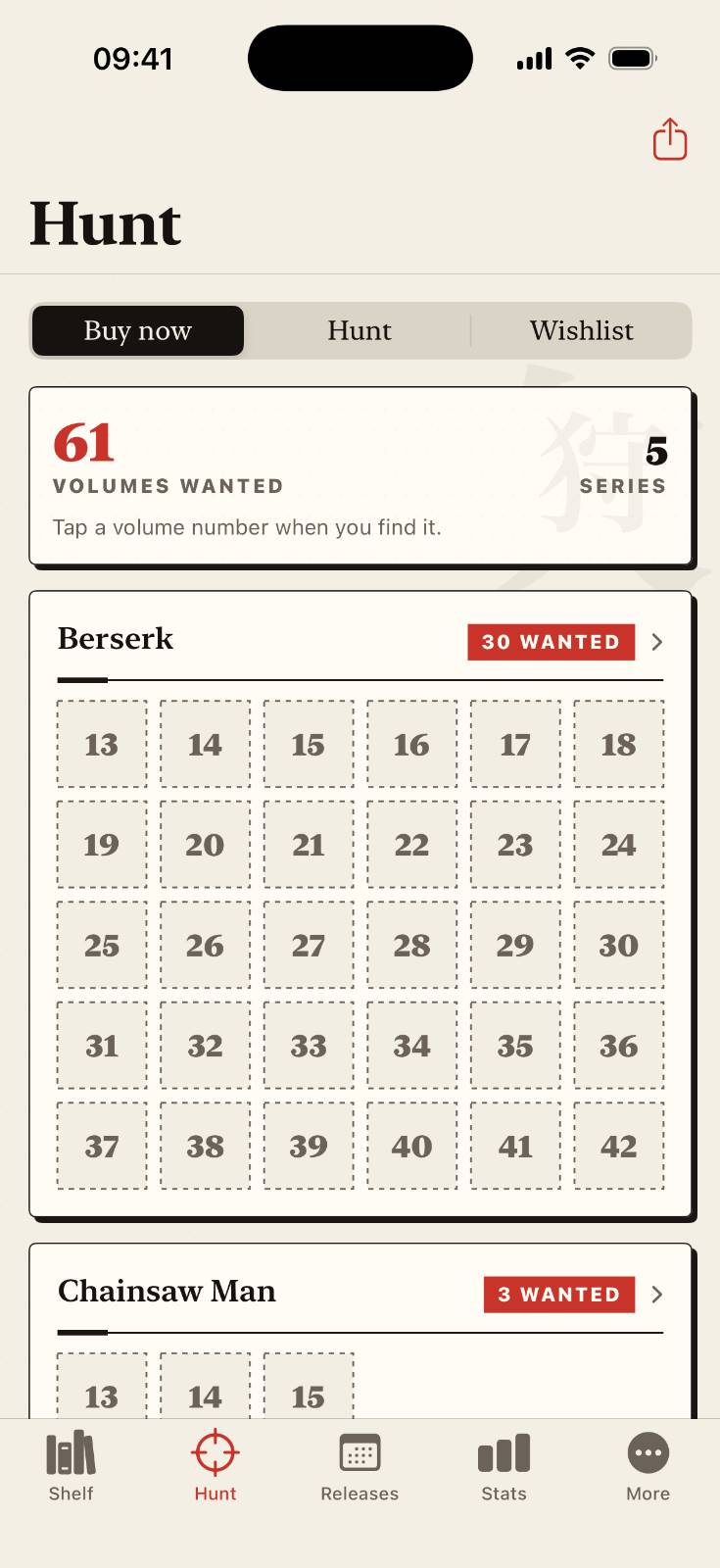
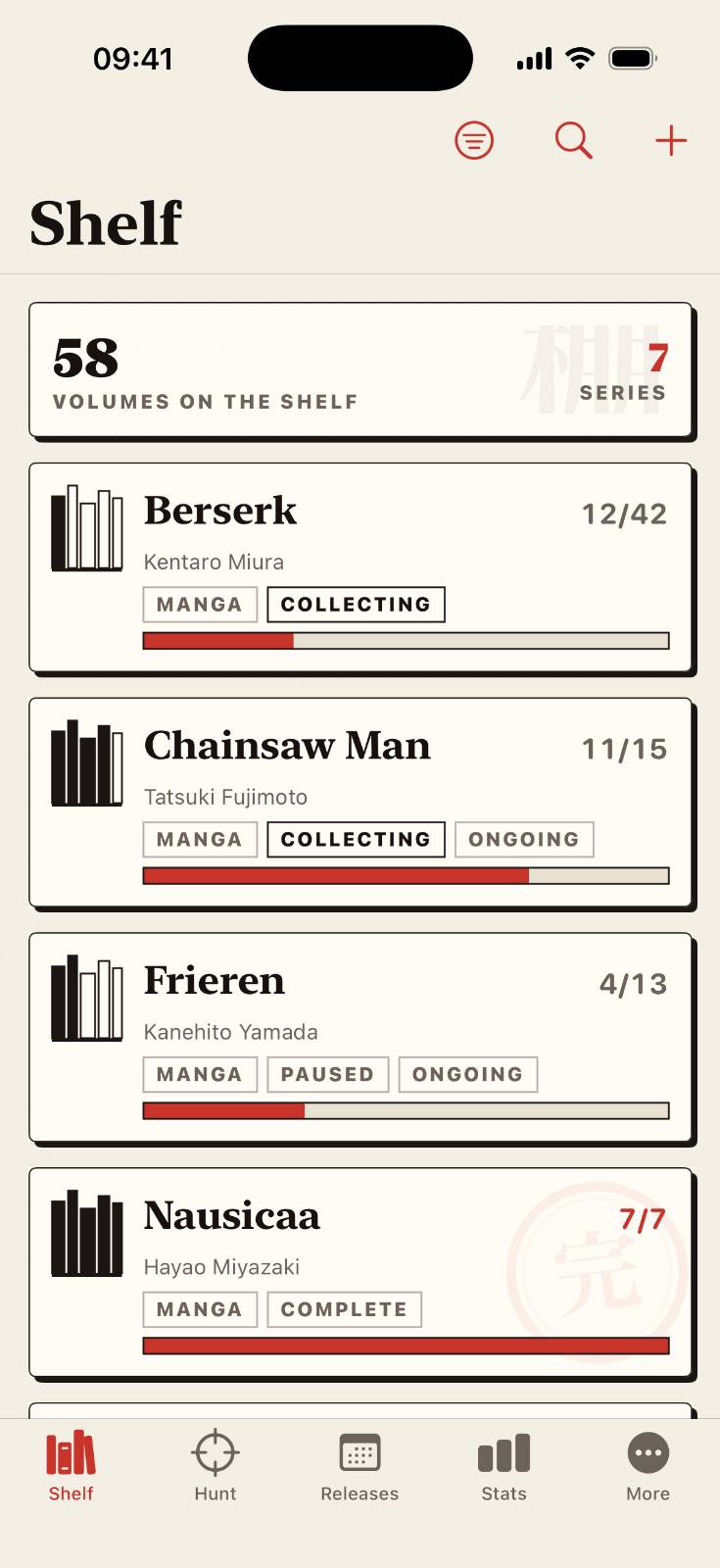
Tankobon: Manga Collection
Your manga collection, beautifully organized.
Tankobon is a thoughtful collection manager for physical manga, manhwa, manhua, light novels, and artbooks. Organize every series, edition, and volume in one visual library, see exactly what is missing, and plan what to buy next.
Your shelf, mapped in perfect detail.
From first volume to complete shelf, Tankobon gives physical media collectors a visual, reliable way to organize what they own and find what comes next.
Your shelf, mapped
Organize manga, manhwa, manhua, light novels, and artbooks in a visual volume grid. Keep series, editions, cover photos, notes, formats, publishers, and shelf locations together.
Track every volume
Mark books owned, missing, pre-ordered, for sale, sold, or traded. Track multiple copies, condition, price, retailer, signed status, and collection notes.
Find what you’re missing
Turn gaps into a clear buying list, grouped by series. Keep wishlists, priorities, notes, and price limits separate from pre-orders for an accurate next purchase.
Omnibus editions, done right
Track multi-volume books without losing the original series structure. An omnibus covering volumes 1–3 correctly fills every included volume.
Never miss a release
Follow ongoing series, manage pre-orders in one place, and receive local release-day reminders directly on your device.
Know your collection
Explore series, volumes, copies, completion progress, spending, purchase history, estimated shelf space, and collection weight at a glance.
Import and export
Bring in an existing collection from CSV or Excel with flexible column mapping, then export your library, wishlist, and shareable purchase lists anytime.
Your data stays yours
No account, ads, analytics, or tracking. Your collection stays on your device, with optional sync through your private iCloud database.
SalonMate - Salon Software
The whole salon on one iPhone, with or without the Wi-Fi.
SalonMate is the offline-first salon manager built for nail and hair studios that run the floor themselves. Every appointment, every walk-in, every payment, calculated on your own device. One flat price, no per-seat fees, and no outage when the connection drops.
The salon floor, start to finish.
From the first booking to the end-of-day totals, keep the whole salon running on your device.
Works with the Wi-Fi off
No Wi-Fi, no cloud login, no outage. Book an appointment, record a payment, close out the day: every screen runs on the device, and only optional iCloud sync ever needs a connection.
A schedule per technician
The day view lays out a timeline for each technician, so a chair, a room and a person never get double-booked. Conflicts are flagged as you type, before anything is saved.
Walk-ins, rotated fairly
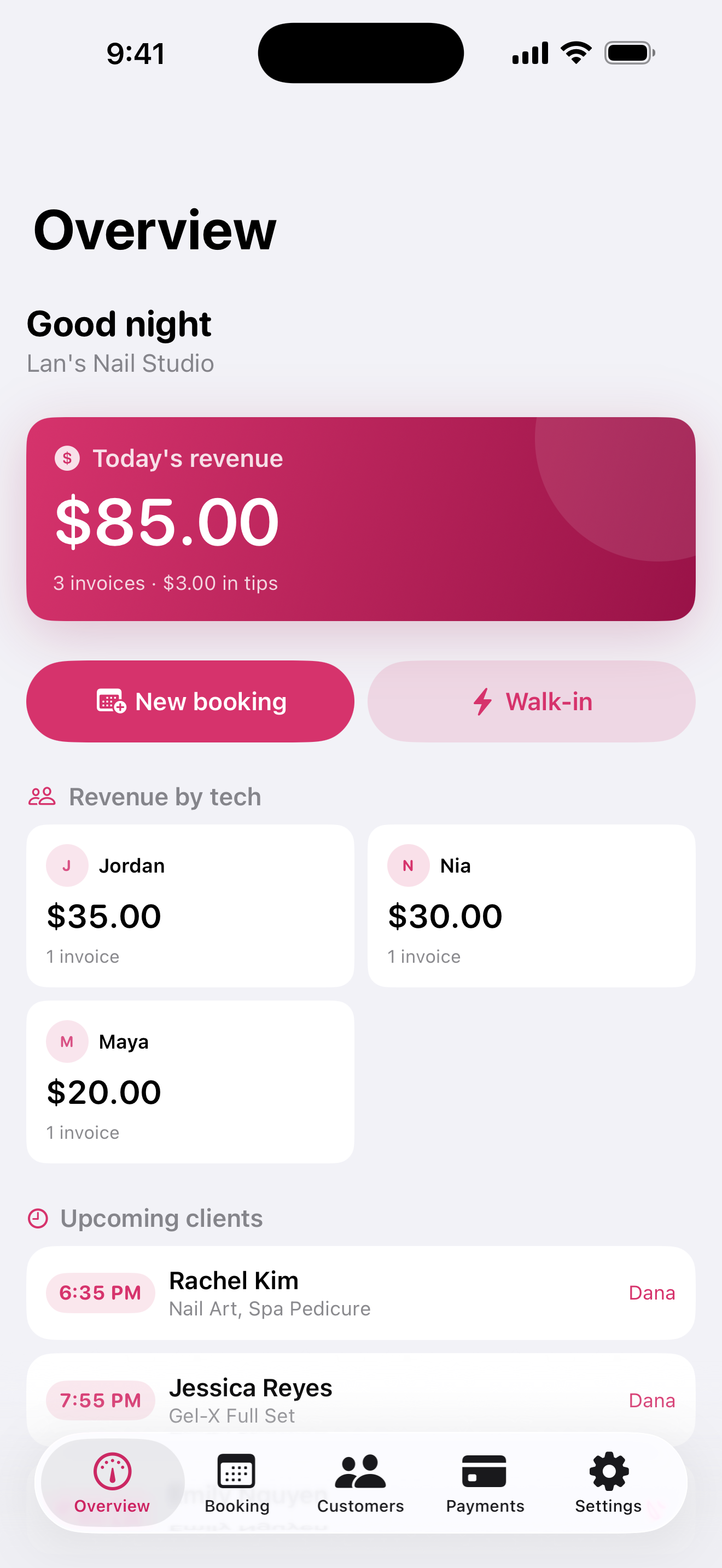
Check walk-ins into a queue and hand the next free chair over with one tap. The turn board ranks who is next by number of turns or by revenue, so the argument never happens.
Three pay models, one payroll
Pay each technician by commission percent, weekly booth rent, or a flat daily rate. End of day reconciles revenue, tips and what each person is owed under their own model.
Every client, remembered
Search the client book by name or phone number and you get visit count, lifetime spend, birthday, notes and allergies on one screen. Bring an existing list in from a CSV, and upcoming birthdays surface on the overview.
Know what pays best
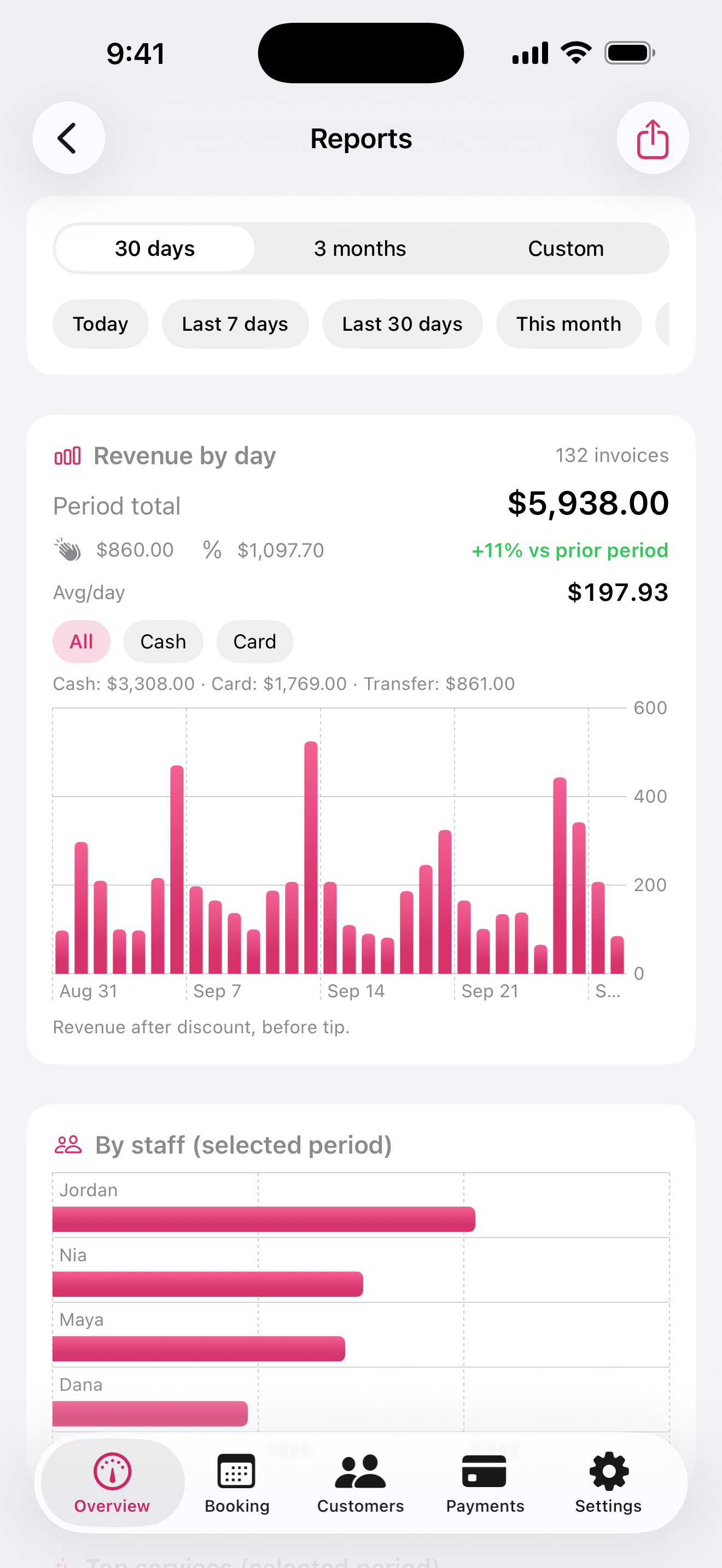
Reports cover any period you pick, with a comparison against the one before it. Revenue broken down by service and by technician, payroll totals grouped by pay model, filterable by payment method.
One price for the whole salon
SalonMate costs the same for one technician or for ten. No per-seat fees, no per-location fees, no transaction fees, no paid add-ons. The free tier covers a single active technician.
Your data leaves with you
Export the whole database as JSON or CSV whenever you want, on any plan including the free one. No export fee, no support ticket, no retention period. Move to a different tool in an afternoon if you ever want to.

BPLeaf: Blood Pressure Diary
Your blood pressure diary, kept together.
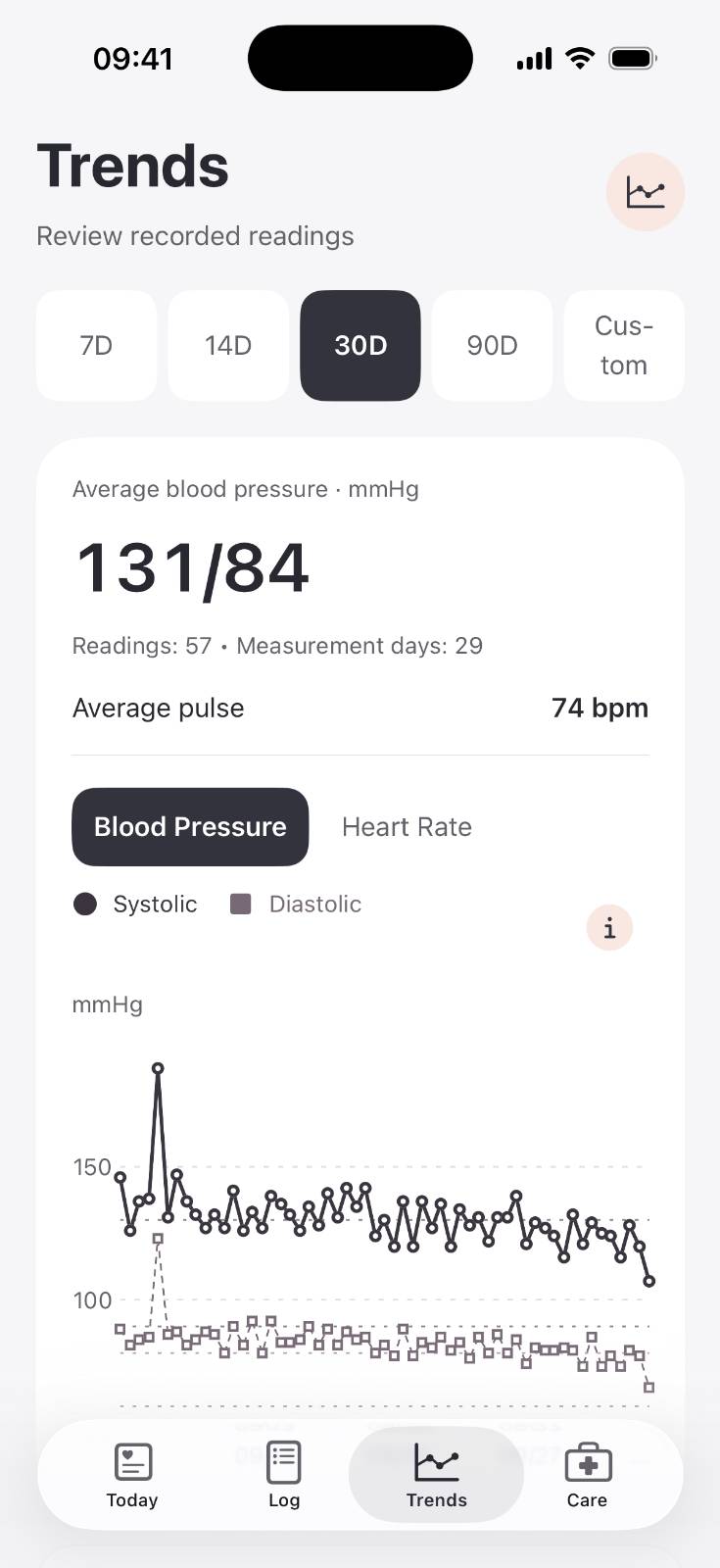
BPLeaf records the systolic, diastolic, and pulse readings you take with your own monitor. Review patterns, keep your routine, and bring a clear report to your next appointment. No account needed.
Free to use. Private by design.
Free to use. Private by design.
A personal blood pressure diary for your readings, routines, and appointment reports.
Record exact numbers
Enter systolic / diastolic in mmHg and pulse in bpm, with date, time, and arm. Keyboard or whole-number picker, review before saving.
See your patterns
7, 14, 30, 90-day and custom charts with averages, min / avg / max, and measurement-day counts. Descriptive summaries, not a diagnosis.
Keep your routine
Local measurement reminders, optional morning / evening plan, and medication self-check-in. You control what's on.
Bring to appointments
Select a date range and export CSV or PDF for your clinician. Reports describe recorded readings only.
Backup you control
Create password-encrypted backup files, preview before restoring, with safety-copy recovery. No password recovery service — keep it safe.
Private and local
Diary stored on your device. No account, no ads, no analytics SDK, no cloud sync. English and Vietnamese included.
BPLeaf does not measure blood pressure, diagnose illness, or recommend medication. Reference categories are general adult educational information. Consult your clinician for decisions. In an emergency, call your local emergency number.
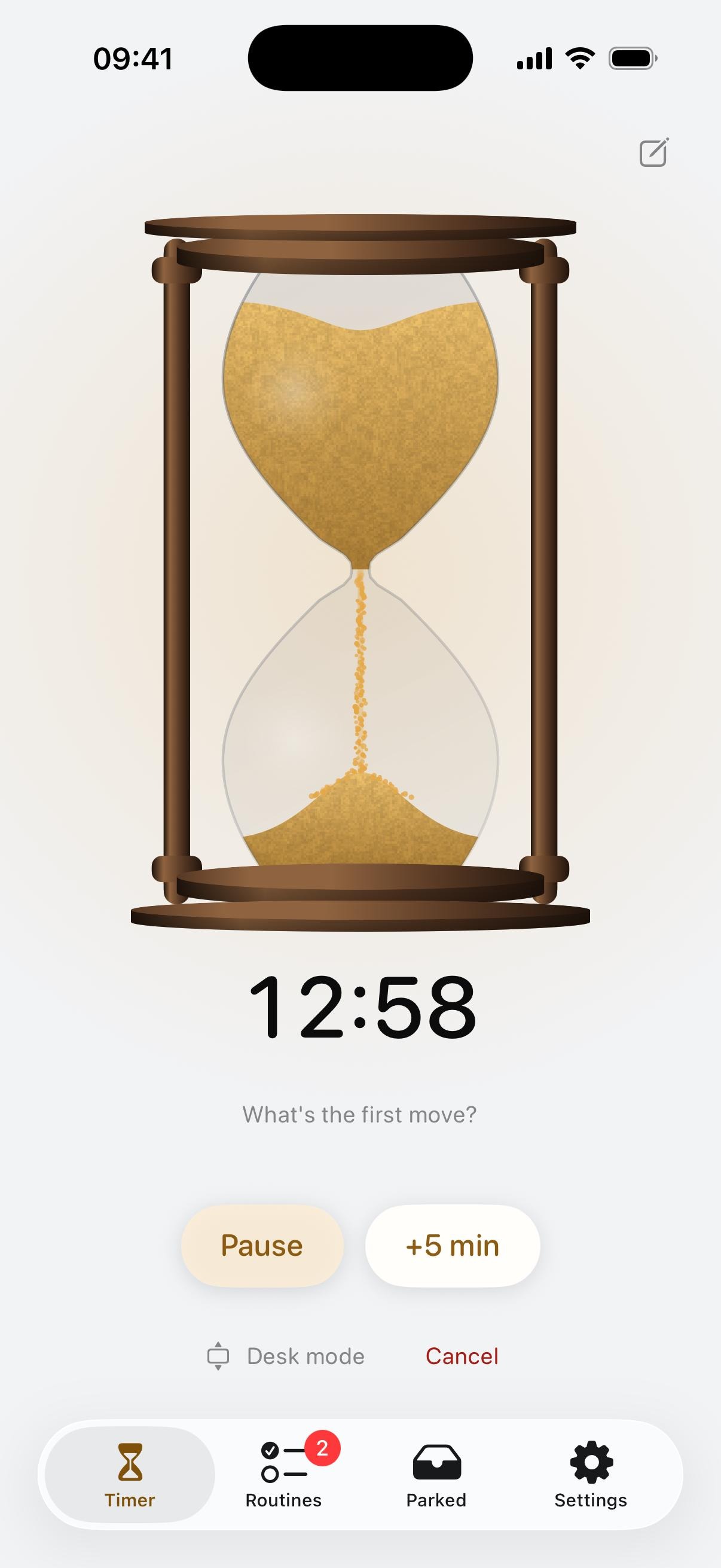
Halftime: ADHD Sand Timer
Time you can see.
Halftime turns every timer into an hourglass. Watch the sand fall, get a kind heads-up before it runs out, and stay in the moment without staring at numbers.
For people with ADHD and time blindness, a number like "17:42" means very little. Twist to set it, let it run on your Lock Screen, and let it nudge you gently when it matters. No subscription, no account, no tracking.
Built for how focus really works.
Time shown as sand in a glass, because your brain reads "half full" faster than any number.
Twist to set
Turn the glass like a kitchen timer. Feel a click for every minute, let go, and it is running. Name the session ("Deep work", "Pasta") and the name follows it everywhere.
Always in view
Live Activity on the Lock Screen and in the Dynamic Island. Start timers from Home Screen and Lock Screen widgets without opening the app.
Desk mode
Turn your phone sideways and it becomes a full-screen clock you can read from across the room.
A gentle heads-up
A soft warning five minutes before time is up, so the ending never catches you off guard.
Kind, not loud
Going over time is not failure. No red alarms, no guilt. If hyperfocus takes over, Halftime nudges you back, a little more firmly each time.
Built-in breaks
When a session ends, the hourglass flips into a short break, then tells you when it is time to get back.
Brain dump
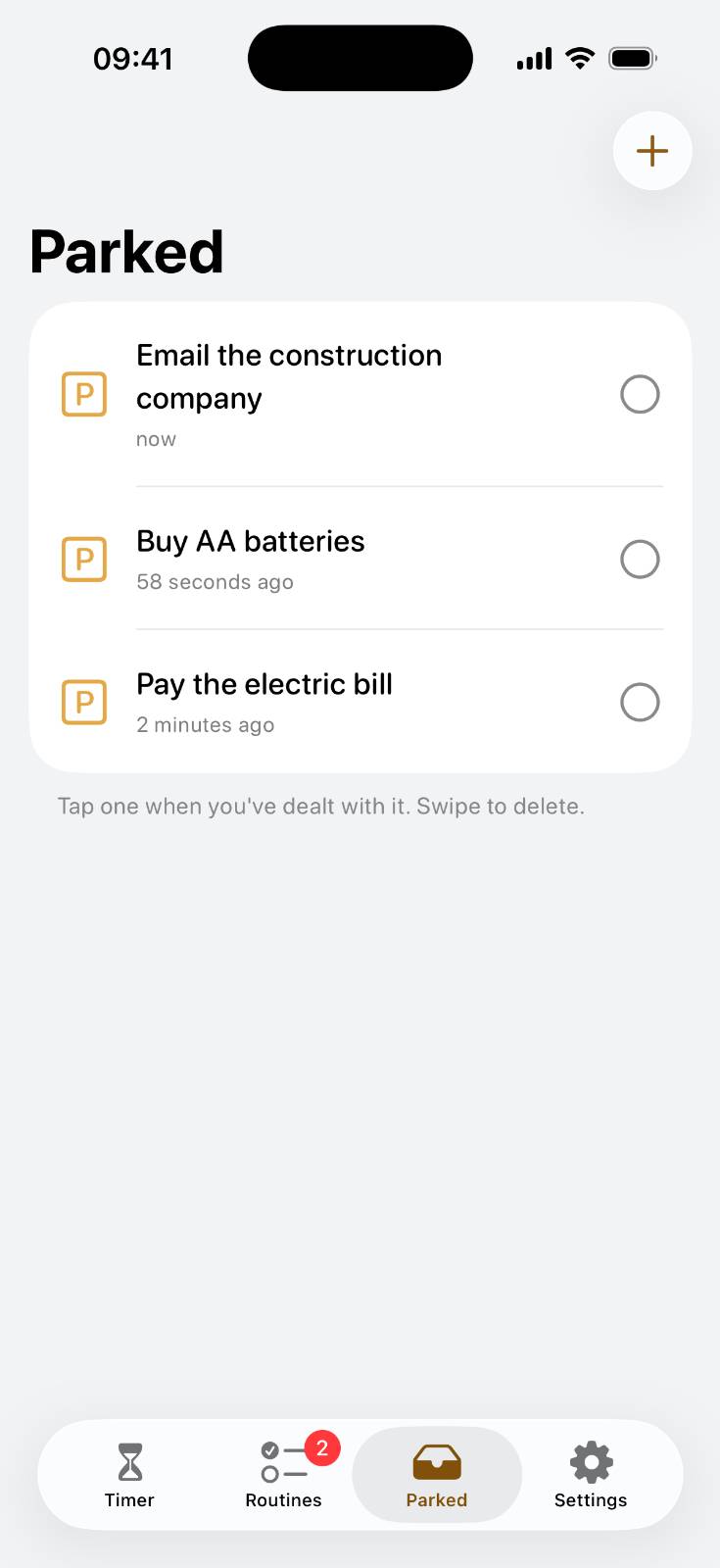
Park a stray thought in three seconds and get right back to work. It waits for you in the Parked tab, and you can send thoughts from any app through the share sheet.
Focus sounds
A soft wooden tick and four kinds of brown noise to help you settle in.
See your progress
Every finished session pours its sand into a small pile, so a good day is something you can actually see.
Routines
For the every-few-days tasks that slip: watering plants, changing a toothbrush head, backing up your phone. Halftime tracks the cycle and shows what is due, without dates or guilt.
Pay once, own it forever
No subscription, no in-app purchases, no ads. Every feature is yours.
Private by design
No account, no tracking, no analytics. Your timers, routines, and parked thoughts never leave your device.
Five apps live on the App Store
GroomDesk, ParKeeper Golf Scorecard & GPS, SitePic, Tankobon, and SalonMate are available now. Tell us what you think, or just send feedback. We read every message ourselves and usually reply within one business day.